Remote HAM operation (remote SDR panorama, remote CAT control, remote PTT/TX, and remote audio)
published:
This post describes how I have set up everything I need for remote HAM operation.
VPN
Do not bother with port-forwarding on your router(s), it's insecure and clumsy, simply setup a VPN (virtual private network), like Wireguard.
Remote SDR panorama:
-
For my general SDR panorama setup see this post: SDR panorama with antenna switch/splitter
-
for Remote SDR panorama: Simply setup SpyServer at the remote side -- it allows you to send I/Q data remotely
- SDR++ : Source tab: instead of selecting "real" locally connected SDR hardware: Select "SpyServer" as Source and enter IP/port where your SpyServer instance is listening on
Remote CAT control:
- My remote HAM machine (where radio is connected) is Windows as this is the only way to survive with some of HAM software, grr, although most of the common HAM tasks can be done on linux just as well.
- Thus for "transferring serial port data over network":
- Remote: Windows: VSPE: Setup TCPServer device in VSPE (local COM port the one used for CAT for your radio) -- Configure "Data Port" -- as for CAT serial DATA is transfered
- Local: Linux: socat: create virtual serial port pair: one side local, the other side "tcp": tcp:$remote_IP:$remote_port_CAT (If your local is Windows, then just use VSPE: TCPClient)
remote_IP="192.168.188.37"
remote_port_CAT="8888"
remote_port_PTT="7779"

# Virtual local serial port for CAT for HRD (Linux):
virt_port_cat="$HOME/dev/virtualcom1"

# Create virtual port for remote CAT control, connect to remote TCP serial server:
socat pty,raw,echo=0,link=$virt_port_cat tcp:$remote_IP:$remote_port_CAT &
To make this virtual COM port created with socat be visible to HAM Radio Deluxe running in wine on Linux, create a symlink:
# virt port for CAT as to be seen in wine program:
wine_port_cat="$HOME/.wine/dosdevices/com1"
...
ln -sf "$virt_port_cat" "$wine_port_cat"
Note: Wine may overwrite these symlinks to some default values on startup -- I use a script that fixes symlinks shortly after starting HRD in wine.
Remote PTT control via local foot switch
For PTT/TX I use foot switch, both when operating locally and remotely. You can get them really cheap from places such as Aliexpress, example
- To connect the foot switch to computer: USB to serial RS232 (DSUB09) converter, and wire everything so that when foot switch is pressed, voltage is applied to the CTS pin.
- Now the CTS on/off signal has to be transferred to the remote side.
- Remote: Windows: VSPE: Setup TCPServer device in VSPE (local COM port the one configured for RTS PTT) -- Configure "Control Port" -- as for PTT serial control lines (RTS/CTS) are transferred
- Local:Linux: The footswitch then appears to the PC through USB to serial converter as an USB serial device, such as /dev/ttyUSB0: We need to monitor the CTS line of it and at each change, evaluate if it is 1 (CTS ON) or 0 (CTS OFF) and send that info to the remote side.
- For monitoring the CTS line effectively enough I quickly hacked up a C program cts_monitor.c that does a blocking ioctl TIOCMIWAIT syscall (ioctl(fd, TIOCMIWAIT, TIOCM_CTS)) to let kernel notify userspace when the CTS line has changed. On each CTS change the program then outputs either "1" or "0" to stdout.
while (1) {
    /* Wait for CTS to change */
    if (ioctl(fd, TIOCMIWAIT, TIOCM_CTS) == -1) {
        if (errno == EINTR)
            continue;
        perror("TIOCMIWAIT");
        break;
    }
    /* Read new modem status */
    if (ioctl(fd, TIOCMGET, &status) == -1) {
        perror("TIOCMGET");
        break;
    }
    /* And extract CTS */
    int cts = !!(status & TIOCM_CTS);

    ...
    ...
}
Then I have a shell script that runs cts_monitor.c in the following way
# Physical local foot PTT switch  to remote virtual PORT (CTS --> RTS):
./foot_switch_remote_PTT.sh "$ptt_serial_device" $remote_IP $remote_port_PTT &
echo "local foot PTT switch forwarding CTS to remote"
The script is:
$ cat foot_switch_remote_PTT.sh
#!/bin/sh
set -e

if [ $# -ne 3 ]; then
    echo "Usage: $0 <serial_device> <ip> <port>" >&2
    exit 1
fi

SERIAL_DEVICE="$1"
IP="$2"
PORT="$3"

cleanup() {
    trap - EXIT INT TERM
    # kill all children:
    pkill -P $$ 2>/dev/null || true
    pkill cts_monitor
}

trap cleanup EXIT INT TERM

stdbuf -oL ./cts_monitor "$SERIAL_DEVICE" | nc "$IP" "$PORT" &

wait
As you can see, the main thing it does is simple:
stdbuf -oL ./cts_monitor "$SERIAL_DEVICE" | nc "$IP" "$PORT" &On each CTS line change of the foot switch, cts_monitor program will output either "1\n" or "0\n" string, then this is piped into netcat that has opened a TCP connection to the remote side where VSPE TCPServer is listening on and hooked to the local COM port that is configured for RTS/CTS TX triggering at the transceiver. (I figured out sending "1" or "0" is needed by sniffing on the Windows to Windows VSPE TCPClient to VSPE TCPServer TCP connection)
Remote audio
For transfering audio between local side (headset and microphone) and remote side (transceiver FTDX-10 with built-in audio interface) I use Sonobus and it works pretty well!
- For some time I used the "Direct connection", but then I figured out the "connect to group" (-g) option works just as well as you can also use your own connection server (built-in at the Sonobus running at the remote side) - option -c
# Start sonobus, connecting to group "andrej_remote" with username set to "S57ATF_home" and using connection server $remote_IP:10999:

sonobus -g andrej_remote -n S57ATF_home -p radio -c $remote_IP:10999 &

echo "Sonobus started"
Sonobus does not encrypt traffic, but you should use it over your own VPN (virtual private network) anyway, so data passing over internet is encrypted.
Here is the full shell script I use to setup remote HAM operation from my Local linux PC to the remote Windows machine where may transceiver and antenna are: linux_setup_remote_HAM.sh
- To summarize, it sets up all the virtual serial port pairs needed for remote CAT (sending serial data remotely) and for Flrig to HAM Radio Deluxe communication, runs HRD in wine, and Flrig natively, runs cat-relay to sync frequencies between HRD, Flrig, SDR++ panorama and the remote transceiver, sets up everything to monitor the CTS line of my local foot switch and to send CTS line changes to the remote side TCP Serial Server and then to the transceiver to trigger TX, starts and connects Sonobus used for sending audio to/from the remote transceiver.
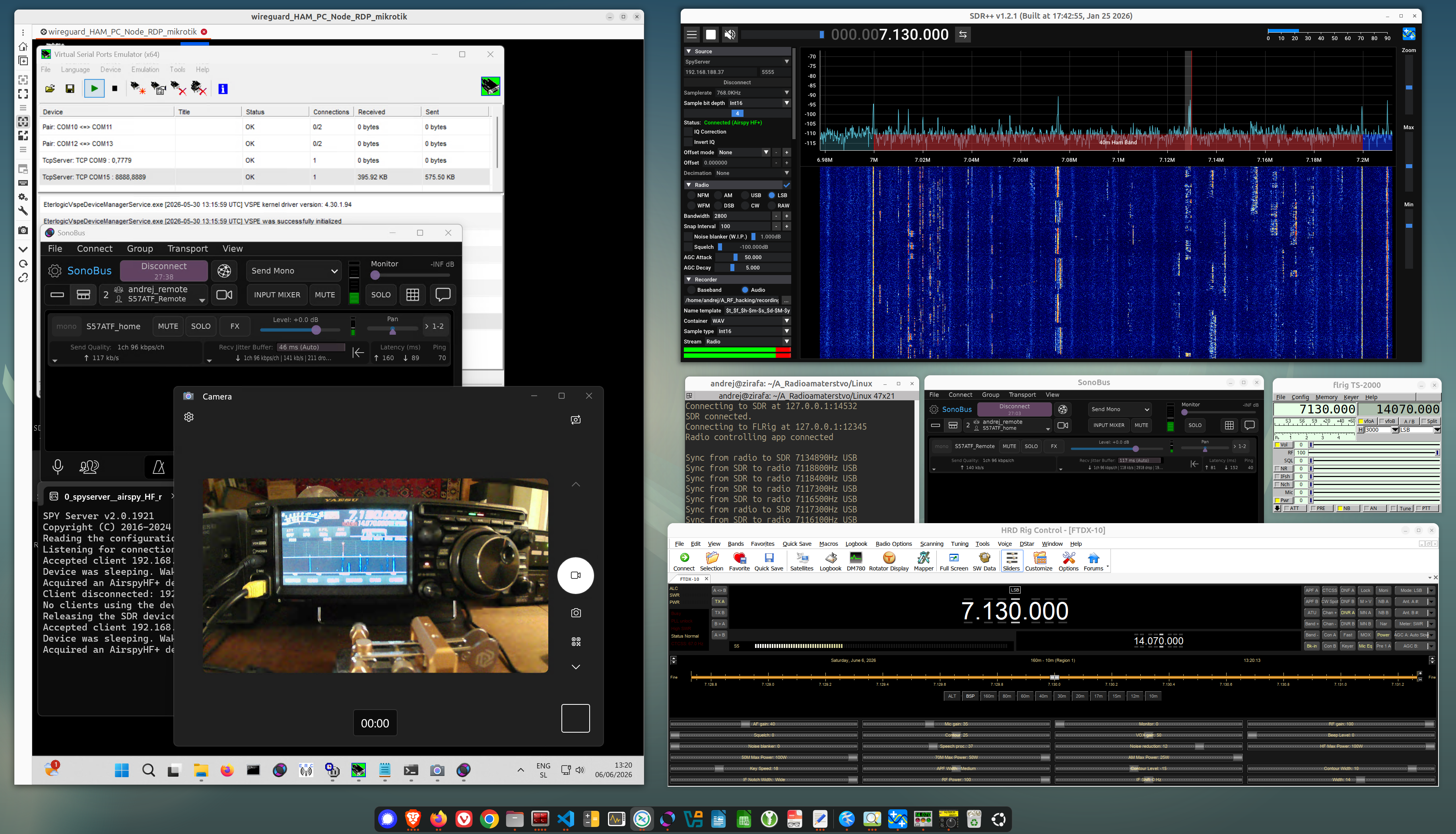 The image above shows my local linux PC running HRD/FlRig/SDR++ all synced to the transceiver at remote side. With sonobus running for transfering audio between local and remote.
On the left is Remmina remote desktop session of the remote PC connected to the tranceiver + camera pointing at and streaming of FTDX-10 front-panel.